



Introduction
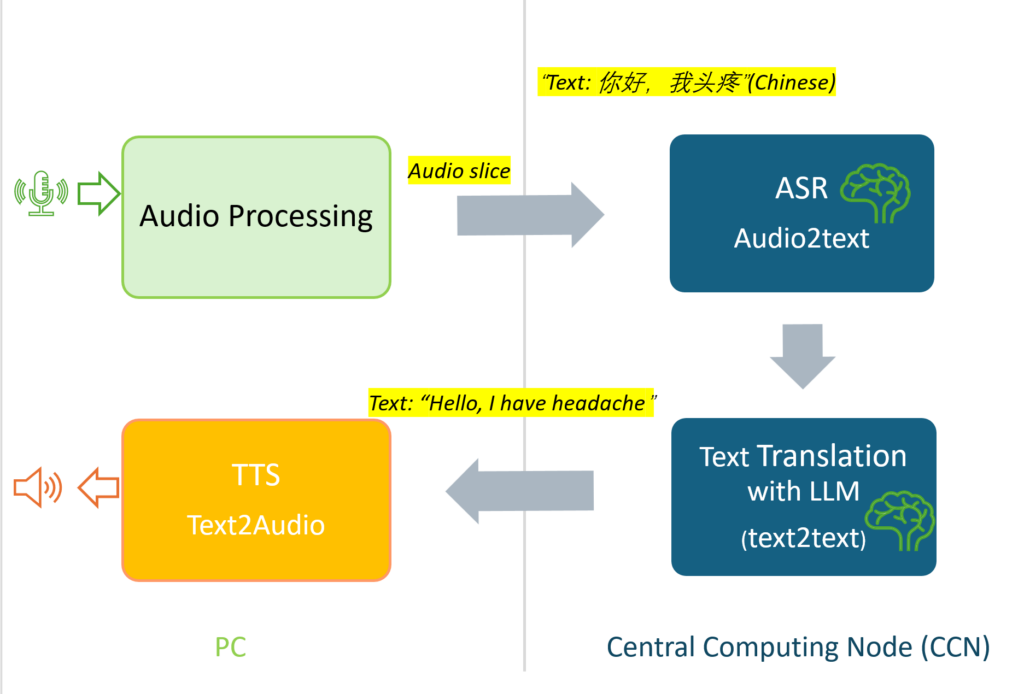
This project builds an end-to-end, real-time speech translation gateway for doctors and patients. By using a Push-to-Talk (PTT) method, users can stream their voice instantly. The system automatically transcribes the audio and translates it into the target language with high accuracy and low latency.
High-Level Architecture
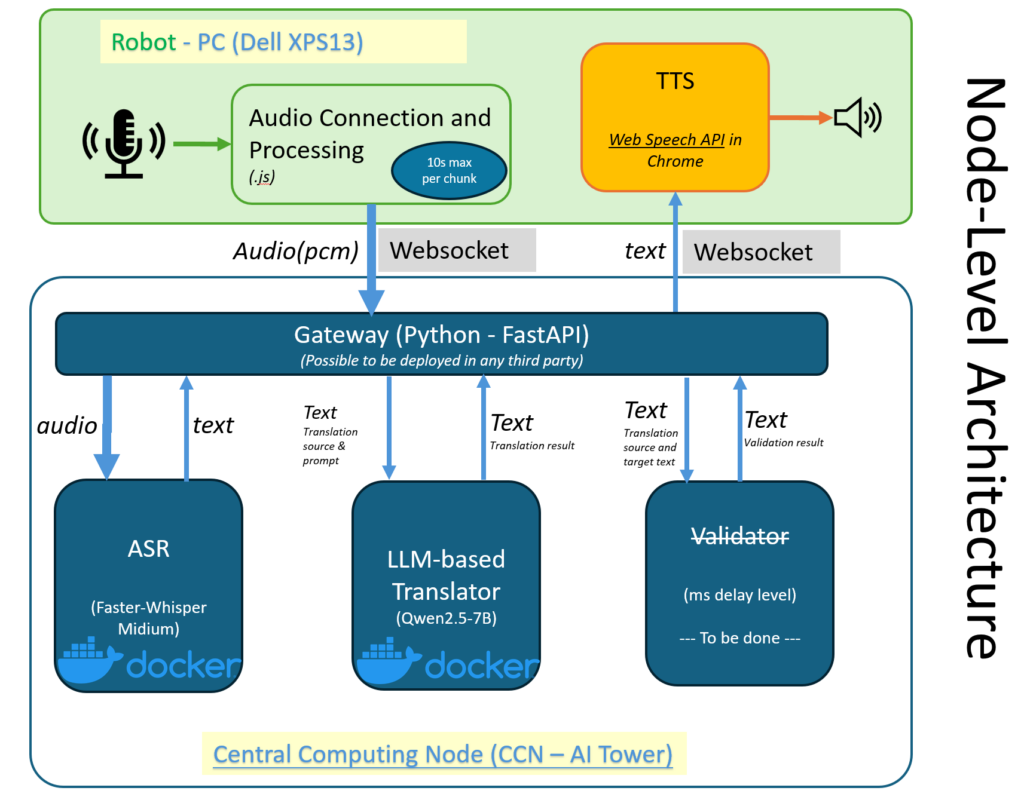
The system consists of three main layers: Frontend Client, Gateway Server, and AI Compute Pool.
[ Frontend Web Client ] (In robot/PC)(Local HTTP shall be enabled)(TTS in Chrome is used)
│ ▲
│ │ (WebSocket: Raw Int16 PCM Audio Streams & Control Frames)
▼ │
[ Python FastAPI Gateway Server ] (In CCN/ any other third party)
│ ▲
│ │ (Local HTTP REST APIs)
▼ │
[ AI Compute Pool (NVIDIA RTX 5080) ] (CCN)
├── Faster-Whisper Server (Docker based) -> ASR (Speech to Text)
└── Ollama Core Server (Port 11434) -> LLM (Medical Translation)
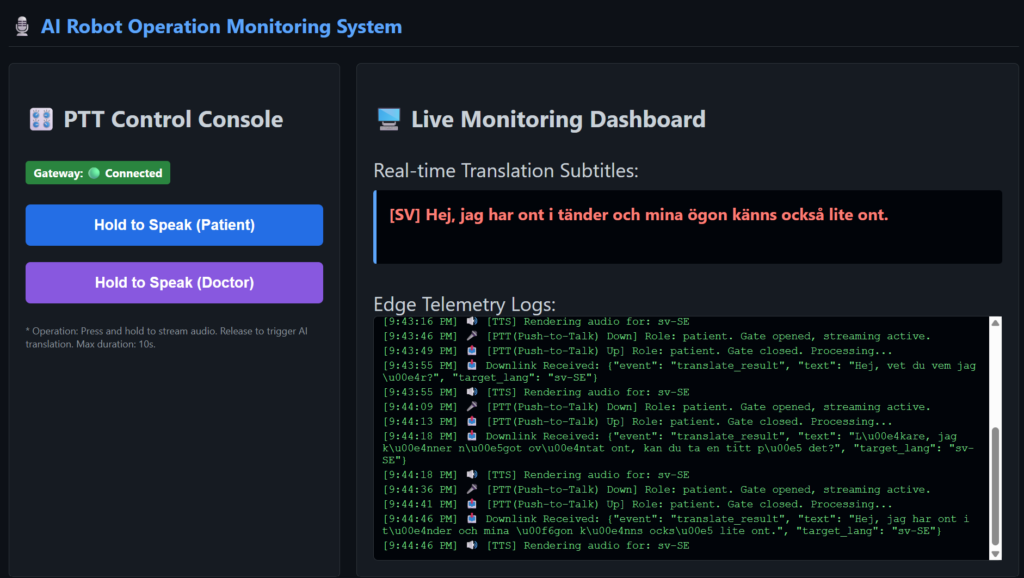
Frontend Web Client Demo
Implementation Steps (How to Deploy)
Step 1: Start the AI Core Services in AI Tower
Launch the Faster-Whisper docker container and setup Ollama. Download the qwen2.5:7b model and configure the environment variables (OLLAMA_KEEP_ALIVE=1 or -1) to keep the model long time / permanently in GPU memory.
Step 2: Run the Gateway Server in AI Tower
Execute python gateway_server.py to start the FastAPI server on port specified when container is set up. This manages the audio buffers and guides the data flow between the frontend and the AI engines.
Step 3: Open the User Interface in Robot node/PC
Open Powershell in Robot/PC node, path to client_web(Index.html),
then to enable local HTTP service: python -m http.server 8080 (8080 can be changed, as long as the port number is not occupied by other application in robot/PC node).
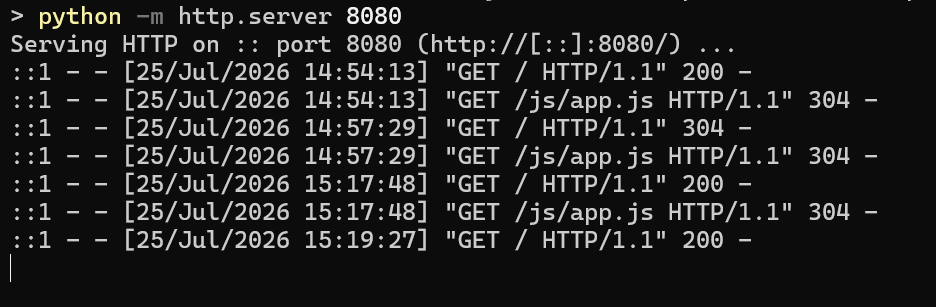
At last, access to http://localhost:8080 in a web browser (not double click the index.html file). It will automatically connect to the gateway via WebSocket.
Step 4: Operate the PTT on webpage on Robot/PC node
Press and hold the button to speak. The raw voice data streams to the backend. Release the button to instantly see the text and hear the translated AI voice.
More progress can be checked in gateway server:

Key Architecture Highlights (AI’s summary)
- Distributed, Decoupled Architecture
We opted for a “Light Client, Heavy Compute” design model. Portable devices (like mobile medical carts or handheld hardware) run only a lightweight web interface inside a standard browser. All compute-heavy ASR and LLM processing is completely isolated and offloaded to a dedicated GPU compute node in the local network. This keeps edge hardware cool, quiet, and power-efficient without sacrificing AI speed. - Zero-Delay Inference via VRAM Locking
In a Push-to-Talk (PTT) interface, waiting several seconds for a model to “cold start” ruins the natural conversation flow. By configuring our backend services to permanently keep model weights warm in GPU VRAM (via OLLAMA_KEEP_ALIVE=1 and container optimizations), both our speech recognition and 7B medical language model respond instantly the moment a user finishes speaking. - Stream-Gated PTT Audio Pipeline
To handle real-time streaming reliably, we built a persistent Web Audio hardware pipeline on the client side. By controlling streaming via a precise physical state gate (isStreamingAllowed), the system executes microsecond-level audio cuts on button press and release. This completely eliminates tail-end audio distortion and prevents background room noise from accidentally triggering translation calls. - Domain-Specific Cross-Lingual Alignment
Translation quality in healthcare requires high precision—a single misinterpreted symptom can be dangerous. We implemented specialized system prompts in our local LLM to build a dedicated, bidirectional alignment channel (e.g., Chinese ↔ Swedish), preserving subtle clinical context, professional medical terminology, and patient intent.
The Roadmap: Future Improvements
While the core system delivers low-latency, accurate translations, there are several exciting directions for the next iteration:
Streaming Speech Synthesis (End-to-End TTS): Currently, the system relies on the client browser’s Web Speech API for audio playback. We plan to integrate a dedicated, lightweight streaming TTS service (e.g., ChatTTS or CosyVoice) directly into the GPU compute pool. This will enable token-by-token audio generation, allowing the robot to begin speaking before the LLM has even finished generating the full text sentence.
WebAssembly Voice Activity Detection (VAD): Adding client-side VAD (such as Silero VAD compiled to WebAssembly) will provide a safety layer over manual PTT controls. Even if a user holds the talk button indefinitely during a pause, local VAD can automatically chunk speech segment boundaries for smoother processing.
Context-Aware Medical Conversations: Expanding the gateway to support multi-turn session IDs will allow the LLM to retain preceding dialogue history. Factoring in previous symptoms or context within the conversation will further elevate translation accuracy for complex clinical visits.
One-Click Container Orchestration: To streamline deployment across different hospital nodes, we plan to package the Gateway, Faster-Whisper, and Ollama services into a unified docker-compose environment with automated health checks and GPU memory allocation rules.